
The Monthly Tasks
Keep your systems running smoothly each month!

The Systems:
Let's dive into maintaining effective onboarding and contact systems through the consistent monthly tasks. A well-structured onboarding process sets the tone for growth, while an organized contact system ensures seamless communication and collaboration across your team.
In this lesson, we’ll explore:
The key monthly tasks that help keep the systems (that you choose) running smoothly.
Import Refresher (at the bottom!)
Remember: Pick the systems that fit your team best, you can do one or all!
The Monthly Newsletter

Send Your Monthly Newsletter- Import an All Accounts Report on or around the first of the month
Your Email Smart List will auto-populate with new downline members and refresh any existing contact details with one simple All Accounts Virtual Office report! (See import details below.)
The Order Reminders

Update Your Contacts Process Dates on or around the 1st of each month for accurate order reminders
NOTE: Text and Email order reminders can be sent to JUST personally enrolled OR you can send email reminders to your whole downline. New customers can get order reminders by adjusting your New Customer Onboarding using the steps here..
Update any changes made to Loyalty Rewards process days with one simple All Accounts Monthly Report. (See import details below.) This report updates process dates for the Reminder system to check again-no furthers steps are needed to keep your Reminders on track!
*When you import an All Accounts report for your newsletter, you're all set for this step, too! The process dates within your contacts will be updated with one simple monthly All Accounts import.
The New Customer Onboarding

Onboard New Customers:-Import a New Customer Report
Your New Customer Onboarding is triggered by the tag added 'New Customer'
Download a Report: In your VO select Personally Enrolled or New to Team, then select the the previous month in the month drop down. (See import details below.)
Import that New Customer report: Add the tag 'New Customer' in the Verify step of the import
*You can also add an additional custom tag here such as 'September24NewCustomers' to filter and find your September 2024 New Customers easily.
*NOTE: If you have new accounts that have not placed an order yet, remove them from your VO report before importing. You can then onboard New Accounts separately using the New Account Onboarding below.
The New Account Onboarding

Onboard New Accounts-The New Account Onboarding is triggered by the tag added 'New Account'
Your New Account Onboarding is triggered by the tag added 'New Account'
Download a Report: In your VO select Personally Enrolled or New to Team then select the the previous month in the month drop down, finally add the filter 'Has Zero PV' (See import details below.)
Import Your New Account Report: Add the tag 'Personally Enrolled' if you ran a PE report to update your PE list and add the tag 'New Account' in the Verify Step to add this list to your Onboarding Workflow
*You can also add an additional custom tag here such as 'September24NewCustomers' to filter and find your September 2024 New Customers easily.
*NOTE: When Onboarding your new customers (who have placed orders) be sure to remove this list of contacts from that report first so you can send a targeted onboarding to the two groups. Onboard New Customers with the steps above.
The New Brand Partner Onboarding

Onboard New Brand Partners- The New Brand Partner Onboarding is triggered by the tag added 'New BP'
Download a Report: In Your VO select Customer to Brand Partner or Direct to Brand Partner and select the previous month in the month drop-down. (See import details below.)
Import Your new Brand Partner Report: In your DM Contacts Screen select the Import Icon in the Contacts Tab. In the Verified Step of Import add the tag 'Brand Partner' to update your BP list and Add the tag 'New BP' to add to the Onboarding (called Onboarding | Brand Partner -Your First Month | Email & SMS) or The Mentorship(for Modern & Co subscribers)
The Oily Refresh Series

Update Your Contacts MWO (Months Without Order) to target "about to go inactive" customers with the Oily Refresh Series
Import an All Accounts Monthly Report: Get an up-to-date MWO (Months Without Order) (See import details below.)
Inside your contacts screen, Filter for MWO: The MWO (Months Without Order)
Select 'More Filters' and search 'MWO' and add equals 9 (or the months without order number you prefer)
Select the check box next to name to select all contacts on the first page. Select 'All' for more than one page of contacts
Select the robot Icon and choose: Outreach: MWO (Months Without Order) Oily Refresh + Nurture Series | Email + SMS to add the filtered contacts to the series.
*When you import an All Accounts report for your newsletter, you're all set for this step! The MWO (month's-without-order) dates within your contacts will be updated with one simple monthly All Accounts import.
The Missed Order Email

Missed Order Email-Send Contacts with missing orders this template the last week of the month
Run Your Missed LR Report: In your Virtual Office generate the "Missed LR" report for the month. (See import details below.)
Import and Tag your report: In your DM contacts screen, select the Import Icon and drag in the report. In the verify step of iport, tag the report "Missed Order and the month.
In the Marketing Tab, Find the 'Missed Loyalty Order' email template and click the three dots to 'Create Campaign' and add any personalizations you want to make to the template
Select 'Send or Schedule" and select the Tag and hit the + button to find the tag you just created
Import Your Young Living Contacts into Diamond Marketing
– A Simple Guide
Importing your Young Living contacts is quick and easy! Just follow these three simple steps to keep your lists and business systems organized each month!
Step One: Download a Report from Your Virtual Office
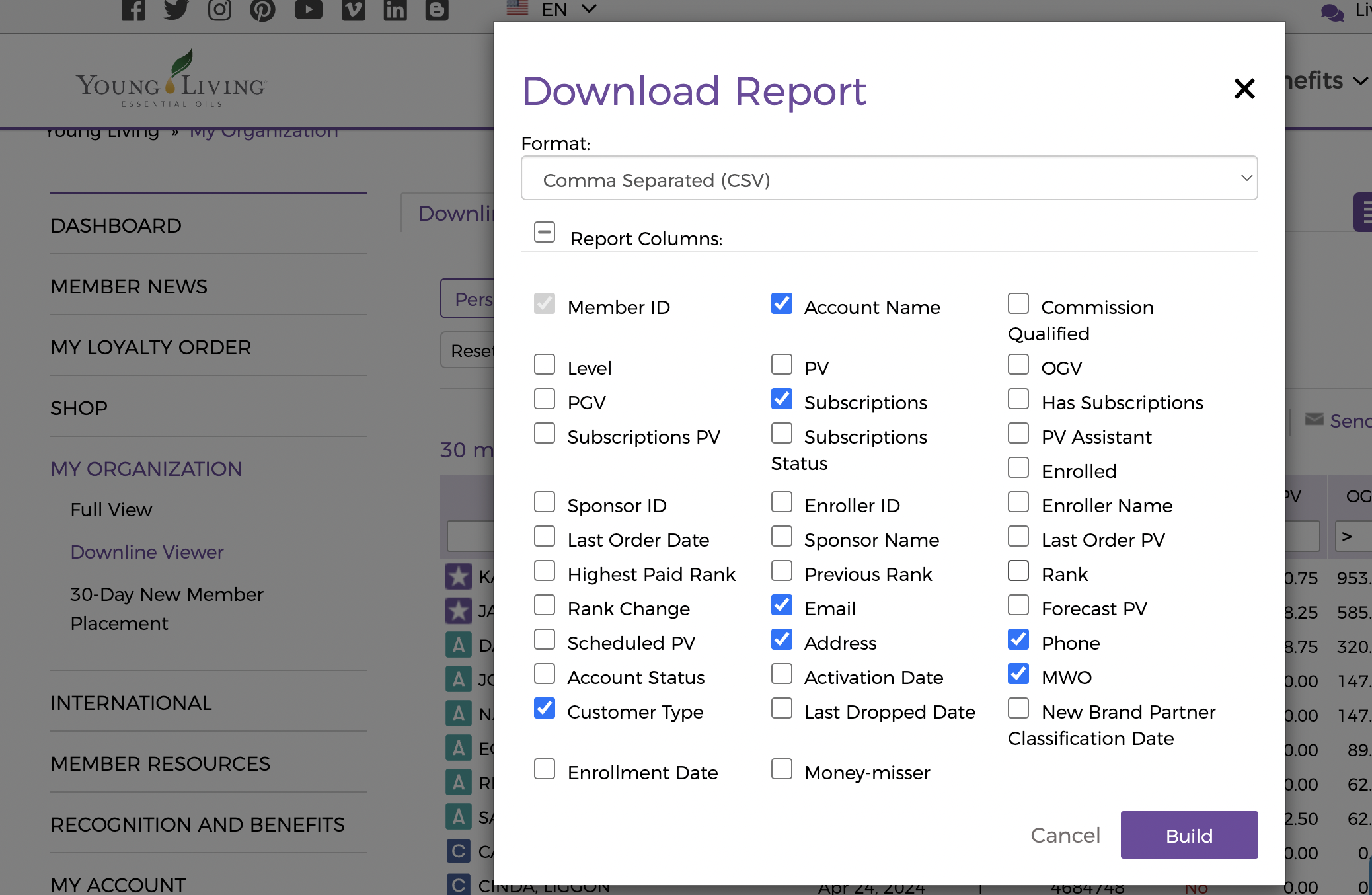
From your Young Living Virtual Office, download the report(s) you need and select these 7 key fields:
✅ Member Name
✅ Phone Number
✅ Address
✅ Months Without Order
✅ Customer Type
✅ Subscription
Step Two: Import the Report to Diamond Marketing
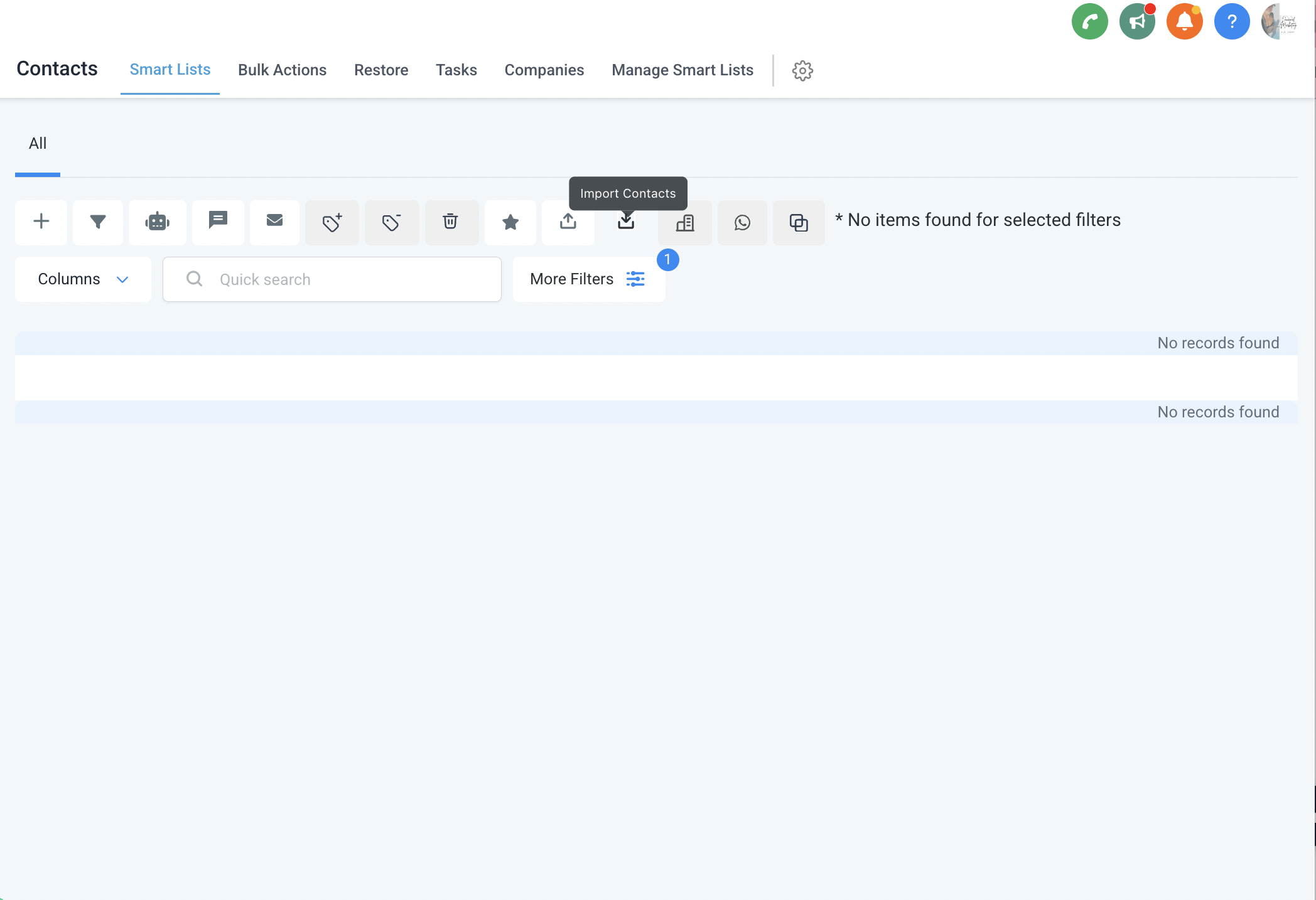
1️⃣ Go to Your Diamond Marketing Contacts Tab and click "Import Contacts" (look for the square icon with a downward arrow).
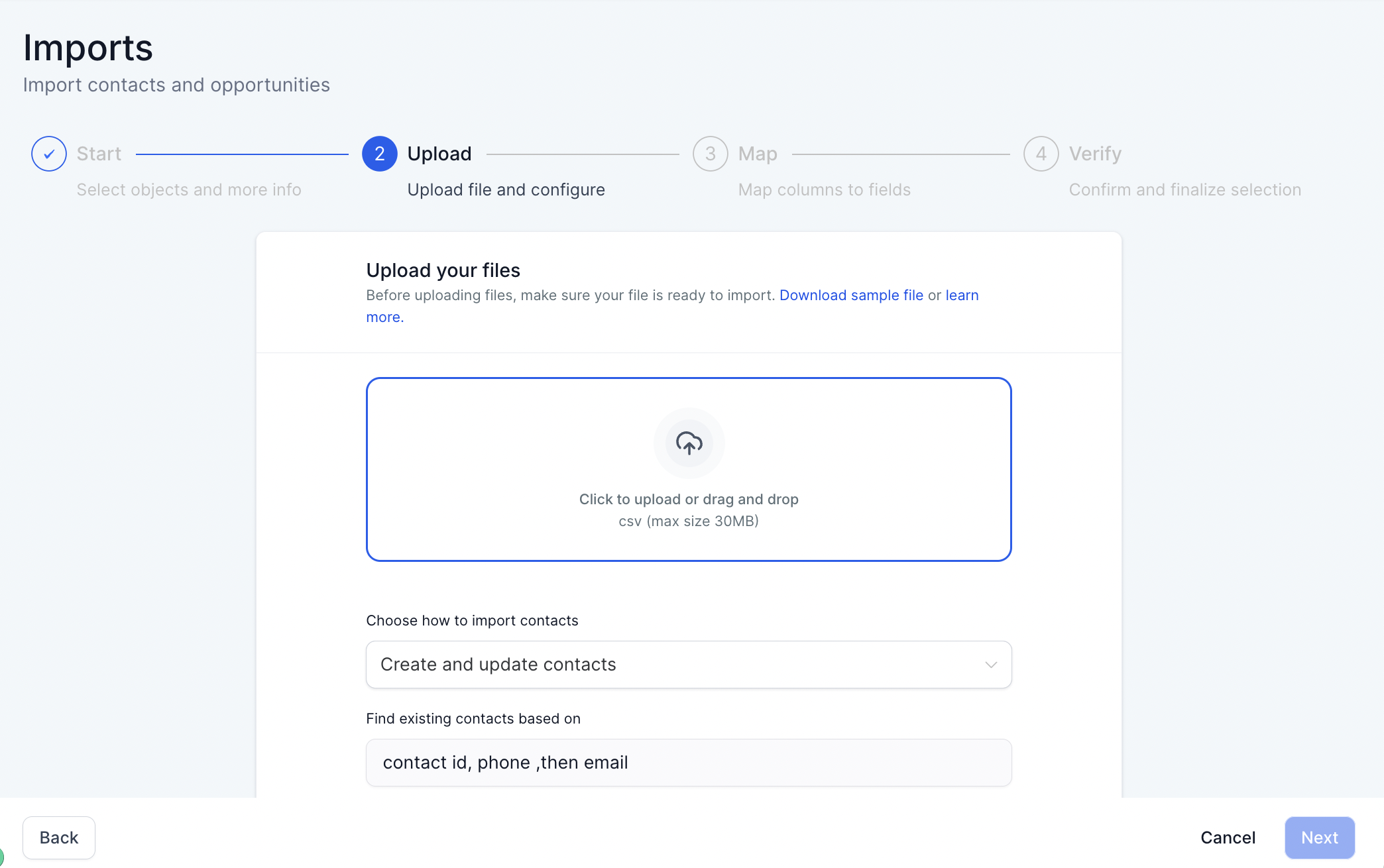
2️⃣ Upload Your CSV File: Drag and drop your Young Living CSV file into the uploader.
Keep "Create and Update Contacts" selected.
If a contact already exists mapped fields will update automatically.
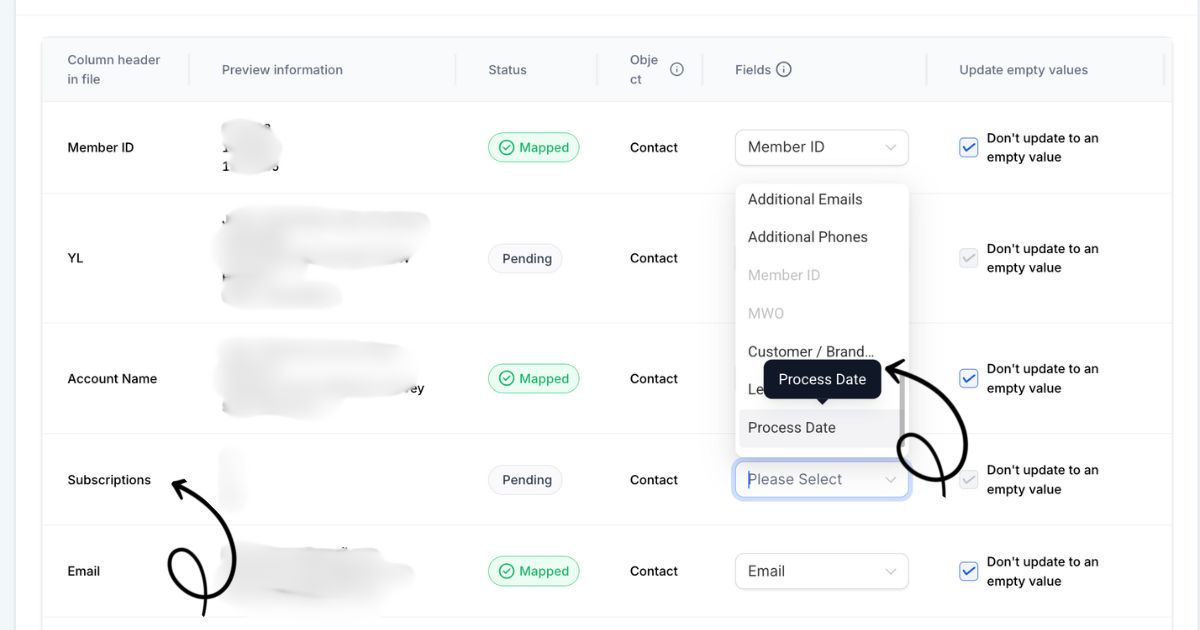
3️⃣ Map Your Fields: Match the Young Living fields to Diamond Marketing fields (ignore preview info).
Customer Type→Customer/Brand Partner
Subscription→Process Day
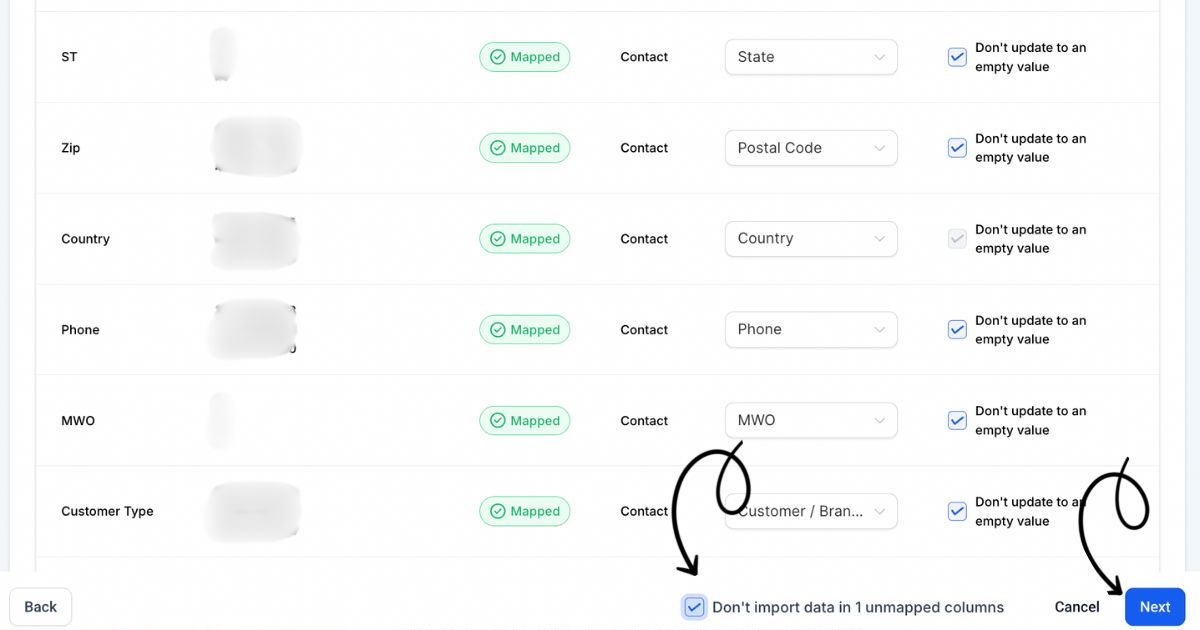
4️⃣ Avoid Importing Unmapped Fields Before clicking Next: Check “Don’t import data in unmapped columns” if:
✅ You accidentally included a field you don’t want to import.
✅ You don’t want to overwrite certain fields, like contact names.
💡Reminder: All mapped fieldswill update for existing contacts.
Step Three: Tag the Import
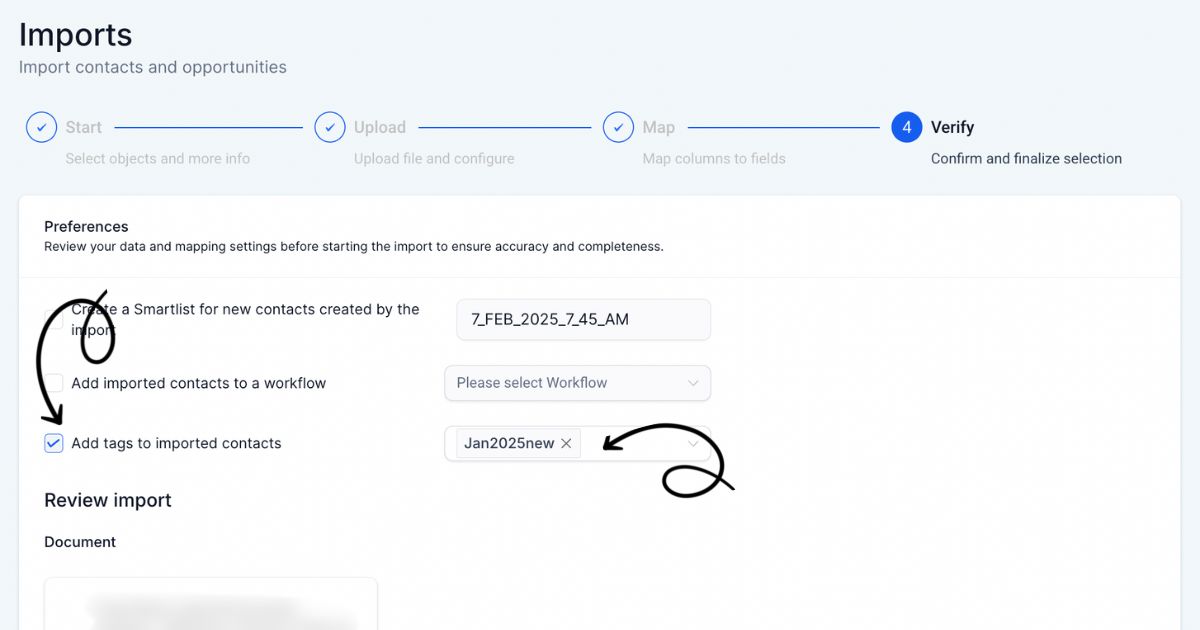
Step 3: Add Tags for Automation
In the final step, assign tags to organize your contacts and trigger automations!
✅ All Accounts Report→ Tag "Downline"
✅ Personally Enrolled Report→ Tag "Personally Enrolled"
✅ Brand Partner Report→ Tag "Brand Partner"
✅ New Customer Report → Tag "New Customer" (Adds them to onboarding!)
✅ New Account Report → Tag "New Account" (Adds them to onboarding!)
✅ New Brand Partner Report→ Tag "New BP" (Adds them to onboarding!)


Diamond Marketing is a customer care platform design for Young Living Brand Partners. All content provided by Diamond Marketing is the property of Diamond Marketing App LLC and cannot be copied or redistributed outside of Diamond Marketing. without prior consent.